
How to Get an Instagram Reel Transcript and Download TXT
Get an Instagram Reel transcript from a public link. Copy or download TXT with AnyScript, then inspect the hook and script structure beside the video.
On this page
To get an Instagram Reel transcript, copy the link to the individual public Reel and paste it into AnyScript's Reels transcript tool. Click Get Transcript, open Transcription, then select Copy or Download → Download as .txt.
This retrieves the spoken text. The written caption beneath an Instagram post may describe the video without repeating its speech. If you need the voiceover or conversation, start with the Reel link rather than copying that description.
Follow the cotton Reel from its link to a TXT file, then look at its opening and structure.
Can't play the YouTube video? Watch it here.
Watch this walkthrough on YouTube.
1. Get the link to the Reel you want
Open the specific Reel and use its sharing controls to copy the link. On the web, you can copy the browser address once the individual post is open.
Here is the real source used in this guide:
https://www.instagram.com/reels/DaDdbMxTdYY/Use the link Instagram gives you. A Reel address commonly includes /reel/ and a post identifier; this example uses /reels/. You do not need to guess a different path or build a URL from the creator's handle.
Before leaving Instagram, check two things:
- You opened the individual post. A creator's profile or an audio page can contain many Reels. Another post using the same sound may have different speech or a different edit.
- The source is accessible. Following a private account can let you watch its Reel without making it available to a transcription service. Instagram distinguishes public and private sharing.
2. Generate the transcript and find the returned text
Paste the link into the Reel tool's video URL field and select Get Transcript. Follow the account or usage prompt if one appears.
When the result is available, open Transcription. Match the source preview to your Reel. Use this panel for the spoken text, then open the analysis views below when you want to study how the Reel is structured. If a partial-result notice appears, keep that limit in mind when saving the file.
A real Reel-to-text result
Subtle’s cotton Reel is shown as 52 seconds long. The transcript follows its voiceover about cotton and clothing in Tiruppur. We downloaded the files from this existing result on October 27, 2026.
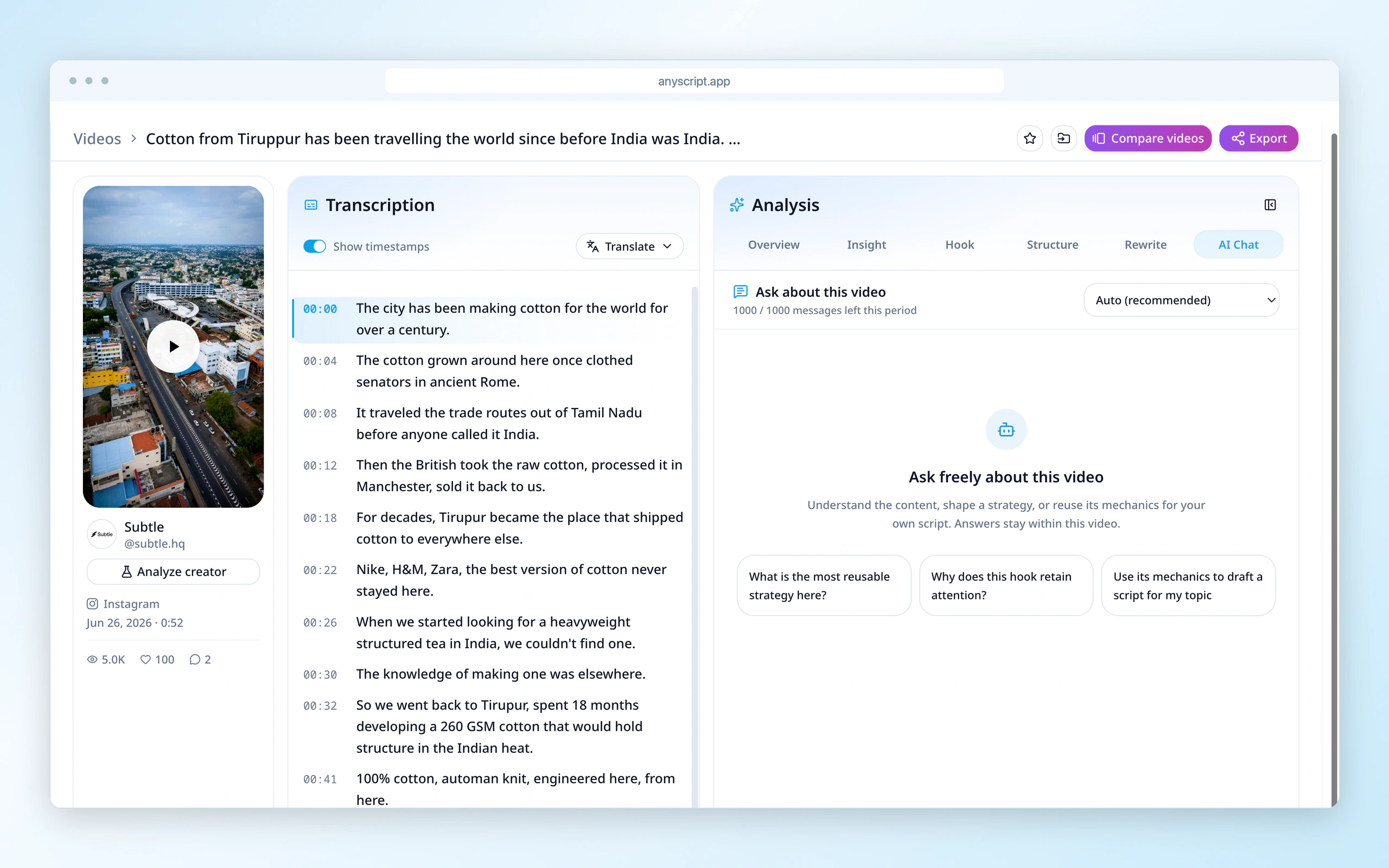
The same Reel appears beside its returned text. The voiceover appears as timestamped text beside the Reel.
The downloaded TXT contains 11 timestamped lines, starting at 00:00; the last line starts at 00:45. That final timestamp locates the beginning of the last line. It does not mean that speech necessarily stops at 45 seconds.
3. Copy the transcript or save a TXT file
Once you have the text, choose the destination you need:
| To do this | Use this control |
|---|---|
| Paste the speech into a document or notes app | Copy, then paste into the destination |
| Include time markers in the copied text | Enable Show timestamps, then Copy |
| Copy without line time markers | Disable Show timestamps, then Copy |
| Keep a local plain-text file | Download → Download as .txt |
Open the saved file after downloading. AnyScript's TXT export includes line timestamps, even if you hid them for copying. You can read and search it in a text editor or paste it into a document.
Replay any sentence you intend to quote, particularly names or numbers.
If you need an SRT subtitle file
Select Download → Download as .srt for timed captions. This Reel’s file has 11 captions and ends at 00:49.339, while the video is displayed as 52 seconds long. Listen to the ending: a closing image may explain the gap, but any speech after the final caption needs to be added. Play the file with your video before using it.
For file-format differences and timing fixes, see the TXT and SRT download guide.
4. Explore the Reel’s hook and structure
If you saved the Reel to learn from it, open Hook and Structure in the Analysis panel after copying the text. Compare the opening with the explanation that follows, keeping the source video beside the transcript.
In this cotton Reel, that means looking at how the opening leads into its account of clothing production. AnyScript gives you a place to study that sequence as well as save the words. Deeper analysis depends on your plan.
Why a Reel link may not produce the text you expected
The tool cannot access the post. Reopen the individual URL. If the Reel is deleted, private or unavailable, seek an accessible original or ask the creator for the transcript. Your Instagram account does not give an external service the same access.
The Reel plays for you, but retrieval fails. This is an access problem before speech recognition can begin. For a short passage, manual replay and typing is a practical fallback. If it is your own Reel, your original script or recording may already contain the text you need.
You get little text from a video full of words. Listen to the audio. A music-backed montage can contain many printed words and very little speech. Read screen-only information from the video separately; changing the link cannot turn silent text into spoken audio.
The last instruction seems to be missing. Check whether it was spoken, printed in the picture or written in the description. If the video continues speaking after the returned text stops, treat the result as incomplete for that passage and transcribe the missing section manually.
Common questions
Is an Instagram caption the same as a transcript?
The post's written caption can be a description, a story or hashtags. Playback captions follow the audio. A speech transcript gives you the voiceover or conversation as text. Instagram's Reels editor explanation also treats audio and added text as separate elements.
Can I use a private Reel link?
This guide covers public Reels. Being allowed to view a private post is not evidence that a link-based transcription service can retrieve it. Ask the creator for the text or an accessible version when needed.
To save your next Reel's speech, open the Reels transcript tool, paste the individual link and download the returned TXT.