Outcome
Specific opening
Establish a relatable reason to care before naming the planter.
Next move
Tie the forgotten watering can to the promised outcome within the first beat.
Emotion · FrustrationPacing · mediumpersonal anecdote · curiosity gap
Extract a YouTube script into timestamped beats, ready to study or rewrite.
Every line of the YouTube video is tagged with the beat it serves, then the lines regroup into a script: hook, explanation, demonstration and CTA, each with the time it runs.
Follow the balcony sample from its forgotten-watering problem to the reservoir explanation, filling and drainage steps, then the suggestion to build a small version. Each label stays tied to the source lines.
Start and end times show where the video spends its seconds: the opening line names the problem before the planter is explained, and the demonstration and CTA take separate stretches.
Keep the extracted script in your library, line it up against other YouTube videos in a Research set, or rewrite the beats for your own product.
The result for the sample balcony-planter how-to: transcript on the left, structure on the right. Each beat links to the line and timestamp it comes from.
 00:46
Sample
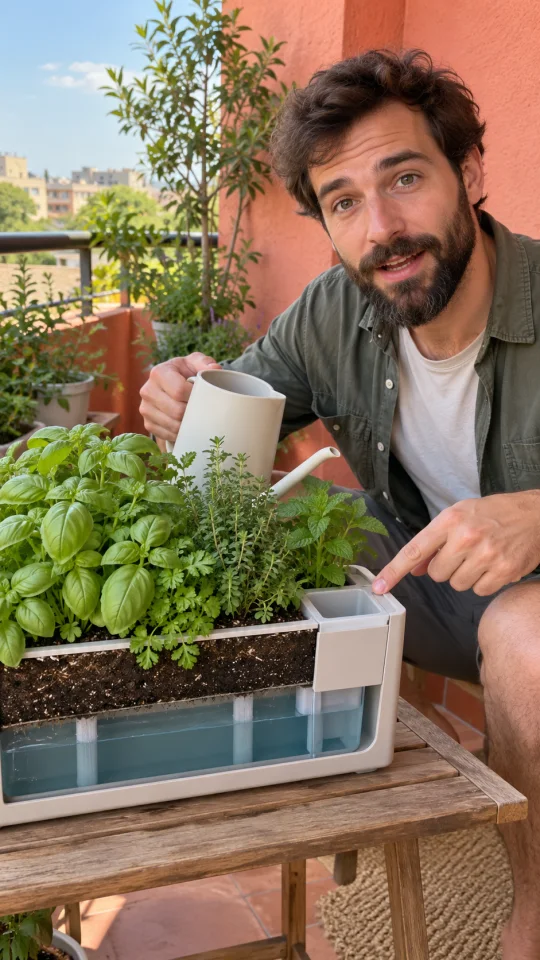
A balcony planter that waters from below
Transcription
TranslateThe smallest balcony is where I used to forget the watering can.
This planter keeps a small water reservoir below the soil.
The roots are not sitting in an open bucket. The water moves upward through the lower layer.
I fill through this corner so I can see when the reservoir is full.
The overflow hole matters because a rainy day should not turn the whole pot into a pool.
Before adding a plant, I check the drainage and make sure I can reach the fill point.
It still needs checking. A reservoir is a buffer, not a promise that plants can look after themselves.
Build one small version first, then decide whether the rest of the balcony needs the same setup.
Outcome
Establish a relatable reason to care before naming the planter.
Next move
Tie the forgotten watering can to the promised outcome within the first beat.
Steps
Explain how the reservoir moves water without roots sitting in a bucket.
Next move
Add a numbered fill step so viewers can copy the action.
Setup
Surface overflow and reachability as pre-planting checks.
Next move
Show the check order: drainage, fill point, overflow.
Pitfall
Set realistic expectations about what a reservoir cannot do.
Next move
Pair the caveat with a visible inspection cue.
Next step
Close with a low-risk testing action before scaling.
Next move
Add a simple result check before the scale-up recommendation.
Frustration
Outcome
Specific opening
0:00–0:08 · Outcome
Short confession, clear mechanism, check, caveat, small next step.
01OutcomeSpecific opening
The smallest balcony is where I used to forget the watering can.
This planter keeps a small water reservoir below the soil.
02StepsMechanism walkthrough
The roots are not sitting in an open bucket. The water moves upward through the lower layer.
I fill through this corner so I can see when the reservoir is full.
03SetupSetup checks
The overflow hole matters because a rainy day should not turn the whole pot into a pool.
Before adding a plant, I check the drainage and make sure I can reach the fill point.
04PitfallRealistic caveat
It still needs checking. A reservoir is a buffer, not a promise that plants can look after themselves.
05Next stepLow-risk next step
Build one small version first, then decide whether the rest of the balcony needs the same setup.
On the video, choose Share, then Copy link. Watch links, youtu.be links and Shorts links all work. Paste it into the box at the top of this page.
You get every spoken line with its timestamp, grouped into hook, explanation, demonstration and CTA beats. Each beat shows its time range and the lines it covers.
Keep it in your library, compare it with other videos in a Research set, or rewrite the structure for your own product. Export TXT, Markdown, SRT or VTT any time.
A YouTube script extractor turns a public YouTube video or Short into a script: the spoken words as text, each with a timestamp, and the structure those words follow. A transcript stops at the words. A script extractor also marks where the hook ends, where the explanation and demonstration sit, and how the video asks viewers to act.
AnyScript extracts the script from a YouTube link. It uses usable YouTube captions or transcribes the audio, groups the spoken lines into evidence-linked beats with a time range for each, and links every label to the line it comes from. It does not recover the creator's original unpublished script, stage directions, native chapters or nonspoken visuals. Save the result, compare it with other videos, or rewrite the structure for your own product.
Most people get the words from captions or a transcript tool, then outline the beats by hand in a doc. It works for one video and falls apart at ten.
The transcript comes first, from YouTube captions when usable or from the audio. Then the spoken lines are grouped into hook, explanation, demonstration and CTA, pinned to the line and timestamp that carries each one.
Extraction starts with every spoken line and its timestamp. AnyScript uses YouTube captions when usable captions exist and transcribes the audio when they don't, in the language the video is spoken in.
Each beat and finding links to the transcript line and timestamp that carries it. Click one to jump to that moment in the YouTube video and check the call before you build on it.
Analysis
Transcription
The breakdown groups the spoken script into beats such as hook, explanation, demonstration and CTA. Each beat shows its time range, the lines it covers, what it is there to do and a next move.
Chat with one YouTube video and get answers that quote its lines: why the hook holds, where the explanation sits, what to change for your product. Turn a good answer into a draft in one click.
Why point out the overflow hole before the build step?
The overflow line answers the worry a reservoir creates: 'a rainy day should not turn the whole pot into a pool.' It also sets up the later check on drainage, so the tutorial addresses the failure case before asking viewers to build.00:00
Ask about content, strategy, or generate a usable script…Keep the hook, angle or structure you extracted, swap in your product, audience and voice, and get a draft that does not copy a single line. Generation starts from an analyzed reference, not a blank prompt.
Pick what to keep from the extracted script, the hook, the angle, the format or the beat structure, and get a new script for your product, platform and length.
Original
DraftBalcony Planter
Save your product, audience, brand voice, default platform and the claims you must mention. Every rewrite starts from that profile, and every version is kept.

Balcony Planter
Creator profile
problem_callout
result_first
curiosity_gap
Extract scripts from a set, give the Research set a short brief, and get three original directions, each with an angle, hook, structure, proof plan and CTA, then a draft with a visual note for every beat.
Skincare competitors: 12 ads
Not “copy this script.” Instead: “use this creative logic for my product.”
Add 3 to 50 YouTube videos or Shorts to one Research set, through single links or a supported channel import, and see which hooks, explanations, proof and CTAs keep coming back.
Every video in the set is broken down with the same fields, so hooks, explanations, demonstrations and CTAs line up in one grid. Each pattern lists the videos that support it and the ones that break it.







Curiosity gap5/12
Paste a public YouTube video or Shorts link. Available captions are used first; otherwise accessible audio is transcribed. Pro channel imports currently fetch Shorts only. Submit regular YouTube videos through individual links, with batch limits determined by your plan.
Compare patterns, evidence and exceptions across videos
3Videos · 3 Brands
Transcripts and breakdowns stay in your library, searchable by what was said, and export to files, Google Sheets, Notion or Obsidian.
Copy transcripts or export TXT, Markdown, SRT, VTT, DOCX, PDF and CSV. Send results to Google Sheets, Notion or Obsidian, with transcript timestamps preserved.
A balcony planter that waters from below
Transcription
00:00The smallest balcony is where I used to forget the watering can.00:04This planter keeps a small water reservoir below the soil.Analysis
Hook archetypeStory OpenAngle categoryConvenienceSearch titles, channels, transcripts, translations and analyses at once: type a phrase and every script that says it comes up. Filter by platform, hook type, format and CTA intent, star the keepers and file them in folders.
… keeps a small water reservoir below the …00:04… Lose them and water leaks out, irritants …00:02… to calm, carbonated water to foam, and …00:07What you get
Example
Before
With AnyScript
Answers for this tool
On the YouTube video, choose Share, then Copy link, and paste it into the box at the top of this page. You get every spoken line with its timestamp, then the script grouped into beats such as hook, explanation, demonstration and CTA, each linked to the lines it covers.
The same transcript and breakdown, wherever the video was posted.
The words, the timestamps and the structure behind them, from one public video or Short.
Transcribe, analyze, research and create